
In today’s fast-paced digital world, communication is everything especially for businesses looking to connect with customers quickly and efficiently. One of the most powerful tools available right now is WhatsApp, a platform used by billions of people globally. If you run a business, learning how to create WhatsApp link for business can completely transform how customers reach you, making your services more accessible and increasing your chances of making sales.
Imagine a potential customer seeing your product online and being able to message you instantly with just one click. That’s exactly what a WhatsApp business link does. Instead of saving your number manually, customers can click a direct link that opens a chat with you immediately. This simple feature improves user experience, boosts engagement, and helps you close deals faster.
In this guide, you will learn how to create a WhatsApp business link, step-by-step, using different methods. Whether you want to create a link with your phone number, generate one online, or even set up a WhatsApp group link for business purposes, this article will walk you through everything you need to know in a clear and practical way.
What is a WhatsApp Business Link and Why Does It Matter?
A WhatsApp business link is a clickable URL that allows customers to start a conversation with your business instantly. Instead of asking people to save your number and then search for you, the link does all the work automatically. This makes communication smoother and more convenient for both you and your customers.
Understanding how to create a WhatsApp link for your business is important because it reduces friction in your sales process. The easier it is for customers to contact you, the more likely they are to take action. Businesses that use WhatsApp links often see higher engagement rates and faster response times.
Additionally, WhatsApp business links can be shared anywhere on social media, websites, emails, and even offline materials like flyers. This flexibility makes it one of the most effective tools for modern digital marketing, especially for small businesses looking to grow quickly.
Benefits of Creating a WhatsApp Business Link
Creating a WhatsApp link is not just about convenience; it’s a smart business move that can significantly improve how you connect with your customers. When you understand how to create a link for business on WhatsApp, you open up new opportunities for faster communication, better engagement, and increased sales. Below are some key benefits explained in detail:
1. Improved Customer Experience
A WhatsApp link makes it incredibly easy for customers to reach you instantly without saving your number manually. This eliminates unnecessary steps and reduces frustration, especially for first-time customers. When communication is quick and seamless, customers are more likely to engage with your business and have a positive experience.
2. Instant Communication and Faster Responses
With a direct chat link, customers can message you in real time, which helps speed up conversations. This is especially important in today’s fast-paced world where people expect quick replies. Faster communication can help you answer questions, resolve issues, and close deals more efficiently.
3. Higher Conversion Rates
When customers can contact you with just one click, they are more likely to take action. Whether it’s making an inquiry, placing an order, or requesting more information, the ease of access increases the chances of conversion. This is particularly beneficial for online businesses and service providers.
4. Increased Sales Opportunities
Every message is a potential sale. By making it easier for customers to reach you, you naturally increase the number of inquiries your business receives. More inquiries often translate into more sales, especially when you respond promptly and professionally.
5. Easy Integration with Marketing Channels
One major advantage is that your WhatsApp link can be shared across multiple platforms. You can add it to your website, social media bios, email campaigns, online ads, and even digital business cards. This makes it easier for customers to contact you from anywhere.
6. Cost-Effective Marketing Tool
Creating and using a WhatsApp link is completely free, making it an excellent option for small businesses with limited budgets. Unlike paid advertising channels, this tool allows you to communicate directly with customers without spending extra money.
7. Personalized Customer Interaction
WhatsApp allows you to have one-on-one conversations with customers, making your communication more personal and engaging. This helps build trust and long-term relationships, which are essential for customer retention and brand loyalty.
8. Supports Automated Messaging Features
When combined with WhatsApp Business features like automated greetings and quick replies, your link becomes even more powerful. Customers can receive instant responses even when you’re not available, improving overall efficiency and professionalism.
9. Builds Trust and Credibility
A business that is easily reachable appears more reliable and trustworthy. When customers know they can contact you directly and get quick responses, they feel more confident doing business with you.
10. Boosts Engagement and Customer Retention
Easy communication encourages customers to reach out more often, whether for inquiries, feedback, or repeat purchases. This increased engagement helps keep your brand top-of-mind and improves customer retention over time.
By leveraging these benefits, you can turn a simple WhatsApp link into a powerful tool for business growth, improved customer relationships, and increased revenue.
How to Create a WhatsApp Business Link with Your Phone Number
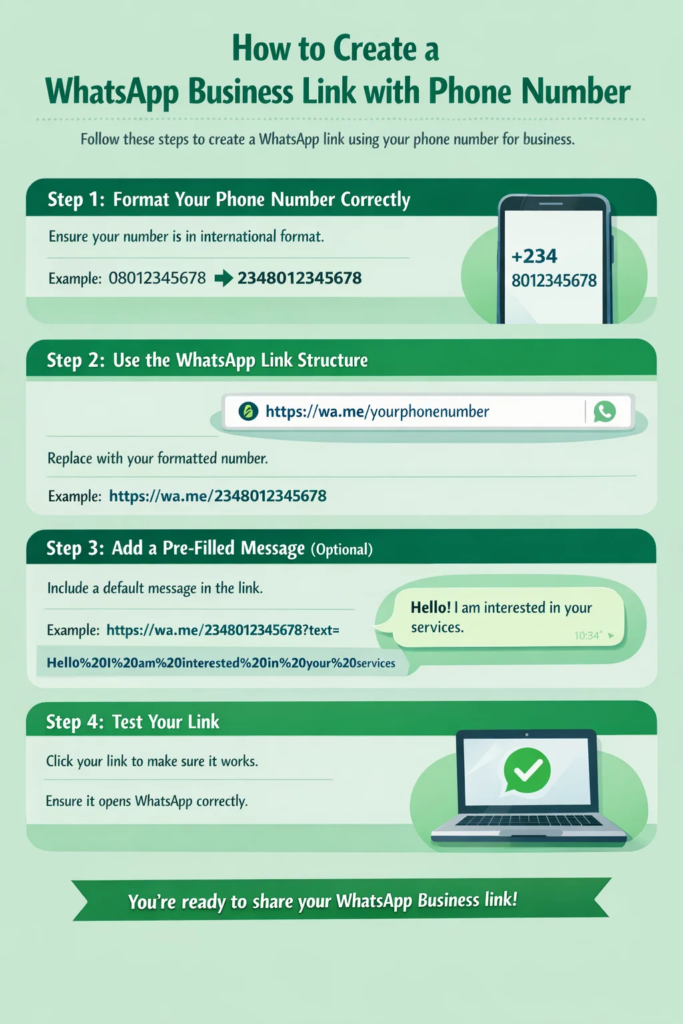
Creating a WhatsApp link using your phone number is the most common and straightforward method. If you’re wondering how to create WhatsApp link for business with phone number, this section will guide you through the exact steps.
Step 1: Format Your Phone Number Correctly
Start by ensuring your phone number is in international format. This means removing the first zero and adding your country code. For example, a Nigerian number like 08012345678 becomes 2348012345678.
Step 2: Use the WhatsApp Link Structure
WhatsApp provides a simple URL format: https://wa.me/yourphonenumber
Replace “yourphonenumber” with your formatted number. For example: https://wa.me/2348012345678
Step 3: Add a Pre-Filled Message (Optional)
To make your link more effective, you can include a default message. This helps guide customers on what to say when they open the chat.
Example:
https://wa.me/2348012345678?text=Hello%20I%20am%20interested%20in%20your%20services
Step 4: Test Your Link
Before sharing your link, test it by clicking on it. Make sure it opens WhatsApp correctly and displays your business chat.
How to Create WhatsApp Business Link for My Number Online
If you prefer an easier method, you can use online tools to generate your link automatically. Learning how to create WhatsApp link for business online can save you time and reduce errors.
Step 1: Visit a Link Generator Website
Search for a WhatsApp link generator online. These tools are free and easy to use.
Step 2: Enter Your Details
Input your phone number and optional message. Make sure your number is in the correct format.
Step 3: Generate Your Link
Click the “Generate” button, and the tool will create your WhatsApp link instantly.
Step 4: Copy and Use the Link
Copy the generated link and use it on your website, social media pages, or marketing materials.
How to Create a WhatsApp Link for Your Business on Social Media
Social media is one of the best places to use your WhatsApp link. Knowing how to create link for my business on WhatsApp and use it effectively can increase your visibility and engagement.
Start by adding your link to your bio on platforms like Instagram, Facebook, and Twitter. This allows visitors to contact you directly without leaving the app. You can also include your link in posts, stories, and ads to encourage immediate action.
Another effective strategy is using call-to-action phrases like “Chat us on WhatsApp” or “Click here to order.” This makes it clear what users should do and increases the likelihood of them clicking your link.
Read Also: How to Advertise Your Business on Instagram: Proven Strategies That Convert
How to Create WhatsApp Group Link for Business
In some cases, you may want to connect with multiple customers at once. Learning how to create WhatsApp group link for business can help you build a community around your brand.
Step 1: Create a WhatsApp Group
Open WhatsApp and create a new group. Add at least one contact to get started.
Step 2: Access Group Settings
Go to the group chat, tap on the group name, and scroll down to find the “Invite via link” option.
Step 3: Generate the Link
Click on “Invite via link” to generate your group link automatically.
Step 4: Share the Link
Copy the link and share it with your audience. You can also reset the link anytime for security purposes.
Best Practices for Using WhatsApp Business Links
Creating your link is only the beginning, how you use it determines the results you get. When you understand how to create a WhatsApp link for business and apply the right strategies, you can turn simple conversations into loyal customers and consistent sales. Below are some of the best practices to follow:
1. Respond Promptly to Messages
Speed matters a lot in customer communication. When someone clicks your WhatsApp link, they are already interested in your product or service, so delaying your response can cause you to lose that opportunity. Quick replies show professionalism, build trust, and increase the chances of converting inquiries into sales.
2. Use Automated Greetings and Quick Replies
Automation helps you stay responsive even when you’re busy or offline. Set up a welcome message that greets customers as soon as they message you. You can also create quick replies for frequently asked questions, which saves time and ensures consistency in your responses.
3. Add a Clear Call-to-Action (CTA)
Don’t just drop your link, guide users on what to do. Use phrases like “Chat with us now,” “Click here to order,” or “Message us on WhatsApp” to encourage action. A strong CTA increases the likelihood that people will click your link and start a conversation.
4. Place Your Link Strategically
To get the best results, share your WhatsApp link where your target audience is most active. This includes your website, Instagram bio, Facebook page, email signature, and online ads. Strategic placement ensures your link reaches the right people at the right time.
5. Personalize Your Conversations
Avoid sounding robotic when chatting with customers. Use their names (if available), understand their needs, and tailor your responses accordingly. Personalized communication makes customers feel valued and improves their overall experience with your brand.
6. Avoid Spamming Your Link
While it’s important to promote your link, overdoing it can harm your brand image. Share your link in relevant and meaningful contexts rather than posting it everywhere repeatedly. This keeps your marketing professional and prevents your audience from feeling overwhelmed.
7. Use Pre-Filled Messages to Guide Customers
Adding a pre-filled message to your WhatsApp link can help customers know what to say when they contact you. For example, a message like “Hello, I’m interested in your services” makes it easier for users to start a conversation and saves time for both parties.
8. Track Performance and Optimize
Monitor how your WhatsApp link is performing by using link tracking tools or observing customer engagement. Pay attention to where most of your clicks and messages are coming from, then focus more on those channels to improve your results.
By following these best practices, you can maximize the effectiveness of your WhatsApp business link, improve customer engagement, and create a smoother communication experience that drives real business growth.
10 Frequently Asked Questions (FAQs)
1. How to create WhatsApp link for business?
You can create it by using the format https://wa.me/yourphonenumber and replacing it with your number in international format.
2. How to create a link for WhatsApp business easily?
The easiest way is by using an online WhatsApp link generator where you input your number and message.
3. How to create WhatsApp business link for my number?
Use your phone number in international format and insert it into the WhatsApp link structure.
4. How to create a WhatsApp link for my business with a message?
Add ?text=yourmessage to your link and replace spaces with %20.
5. Is it free to create a WhatsApp business link?
Yes, creating a WhatsApp link is completely free.
6. Can I use the same link on multiple platforms?
Yes, you can share your WhatsApp link on websites, social media, emails, and more.
7. How to create link for business WhatsApp without coding?
You don’t need coding skills, just use the standard link format or an online generator.
8. Can I track clicks on my WhatsApp link?
Yes, you can use link tracking tools like Bitly to monitor clicks.
9. How to create WhatsApp group link for business?
Create a group, go to settings, and select “Invite via link” to generate it.
10. Can I edit my WhatsApp link later?
You cannot edit the link itself, but you can create a new one with updated details.
Start Growing Your Business Today with a WhatsApp Link
Creating a WhatsApp link is one of the simplest yet most powerful steps you can take to improve your business communication. By learning how to create WhatsApp link for business, you make it easier for customers to reach you instantly, which can lead to more inquiries, better engagement, and increased sales.
The process is quick, free, and requires no technical skills. Whether you choose to create your link manually or use an online generator, the key is to ensure your link is correct and easy to access. Once created, you can use it across multiple platforms to maximize your reach.
Now is the perfect time to take action. Don’t wait, create your WhatsApp business link today and start connecting with your customers in a faster, smarter, and more effective way.